Untrouble: Why This Bold Display Font Is the Smart Choice for Futuristic Design
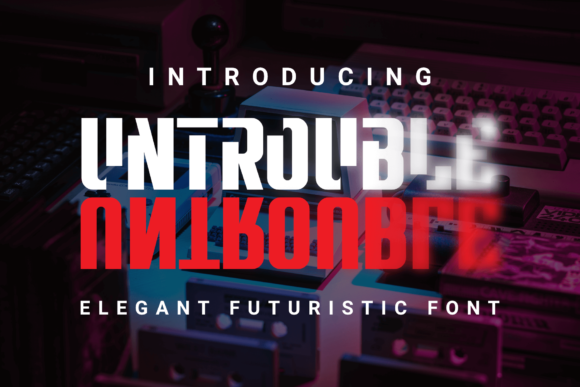
In a digital landscape saturated with clean sans-serifs and delicate serifs, finding a typeface that commands attention without sacrificing readability is a challenge. Enter Untrouble, a bold, thick lettered display font designed to inject a futuristic aesthetic into any project. Whether you are designing a logo for a tech startup, creating a banner for an e-commerce site, or simply looking to add a smart, cool touch to your personal brand, Untrouble offers a distinct visual identity. However, using a heavy display font effectively requires more than just dragging it onto a canvas. It demands an understanding of hierarchy, contrast, and context.
This guide explores how to leverage Untrouble’s unique characteristics while avoiding common pitfalls that can undermine your design’s effectiveness. By focusing on practical application and strategic placement, you can ensure your typography communicates clearly and stylishly.
Understanding the Untrouble Aesthetic
Untrouble is not merely a standard bold font; it is a display font characterized by its substantial weight and geometric precision. The term "futuristic" in typography often refers to fonts that evoke technology, speed, and modernity. Untrouble achieves this through its thick strokes and tight spacing, which create a sense of solidity and presence. When applied correctly, it signals innovation and confidence.
Designers often gravitate toward Untrouble for headers, logos, and short impactful statements. Its thickness allows it to hold its own against busy backgrounds or complex imagery, making it an excellent tool for grabbing the viewer’s eye within the first few seconds of interaction. For entrepreneurs and marketers, this means higher retention rates for key messages because the text itself becomes part of the visual hook.
The Trap of Overuse
The most frequent mistake designers make with heavy display fonts like Untrouble is overusing them in body copy. While it might be tempting to use Untrouble for paragraphs to maintain a consistent "brand voice," doing so creates significant readability issues. Thick letters take up more visual space and reduce the negative space between characters, leading to a dense block of text that strains the reader’s eyes.
Why this matters: If your audience cannot read your content easily, they will leave. High bounce rates negatively impact SEO and user satisfaction. Instead, reserve Untrouble for headlines, titles, and short call-to-action buttons. Pair it with a lighter, highly legible sans-serif for body text to create a balanced typographic hierarchy.
Common Mistakes When Using Untrouble
Even experienced creators can fall into traps when integrating Untrouble into their workflow. Recognizing these errors early can save time and improve the final quality of your work.
- Ignores Contextual Contrast: Placing Untrouble against low-contrast backgrounds (e.g., dark gray on black) diminishes its impact. Always ensure sufficient contrast between the font color and the background to maintain legibility.
- Poor Kerning Management: Because Untrouble has thick stems, default kerning settings may result in characters appearing too close together or awkwardly spaced. Manual adjustment is often necessary to achieve a polished look.
- Misalignment with Brand Tone: Untrouble conveys strength and futurism. Using it for a soft, organic brand like a boutique flower shop may create cognitive dissonance. Ensure the font aligns with the emotional message you wish to convey.
- Neglecting Responsive Scaling: On mobile devices, overly thick fonts can overwhelm small screens. Test your designs at various breakpoints to ensure Untrouble remains crisp and readable across all devices.
Strategic Applications for Maximum Impact
To get the most out of Untrouble, consider these specific use cases where its strengths shine:
Logo Design and Branding
For startups in the tech, gaming, or automotive sectors, Untrouble provides an immediate association with cutting-edge technology. Its bold structure works well in monochrome applications, ensuring your logo remains effective whether printed on a business card or displayed on a billboard. Remember to keep the logo simple; let the font do the heavy lifting rather than adding excessive graphic elements.
Web Headers and Hero Sections
Your website’s hero section is prime real estate. Using Untrouble for the main headline can anchor the page and guide the user’s focus. Combine it with ample white space to prevent the design from feeling cluttered. A large, bold Untrouble headline paired with a minimalistic subheading creates a sophisticated, professional appearance.
Social Media Graphics
In the fast-scrolling world of social media, bold typography stops the thumb. Use Untrouble for quotes, announcements, or promotional offers. The thickness ensures visibility even on small smartphone screens. However, limit the amount of text per image to maintain clarity.
Evaluating Licensing and Compatibility
Before downloading or purchasing Untrouble, it is crucial to verify the licensing terms. Many display fonts come with restrictions on commercial use, number of impressions, or embedding in web projects. Misunderstanding these terms can lead to legal complications or unexpected costs.
Checklist for Buyers:
- License Type: Determine if you need a desktop license, web font license, or app embedding license.
- Usage Rights: Confirm whether the font can be used for client work, merchandise, or broadcast media.
- File Formats: Ensure the package includes the necessary formats (OTF, TTF, WOFF2) for your specific needs.
- Kerning Pairs: Check if the font includes extensive kerning pairs, which significantly ease the design process.
Best Practices for Implementation
Once you have secured the right license, follow these best practices to integrate Untrouble seamlessly into your projects:
Pairing Strategy: As mentioned, pair Untrouble with a neutral, lightweight font. A clean sans-serif like Helvetica Neue, Roboto, or Open Sans provides a perfect counterbalance to Untrouble’s heaviness. This combination ensures that while the headline grabs attention, the supporting text remains easy to digest.
Color Psychology: Untrouble often looks striking in high-contrast colors. Neon accents on dark backgrounds can enhance the futuristic vibe, while stark black and white offers a timeless, authoritative feel. Avoid muddy or desaturated colors unless specifically aiming for a retro-futuristic aesthetic.
Testing Across Devices: Always preview your design on multiple screen sizes. What looks imposing on a desktop monitor might appear pixelated or overwhelming on a mobile device. Adjust font sizes and line heights accordingly to maintain a comfortable reading experience.
Conclusion
Untrouble is a powerful asset for any designer’s toolkit, offering a bold, futuristic presence that can elevate logos, websites, and marketing materials. By avoiding common mistakes such as overuse, poor contrast, and ignoring licensing details, you can harness its full potential. Focus on creating contrast, maintaining readability, and aligning the font with your brand’s core message. With thoughtful application, Untrouble will not only look smart and cool but also communicate your ideas with clarity and impact.