Her and Son: Unlocking the Whimsy of a PUA-Encoded Display Font
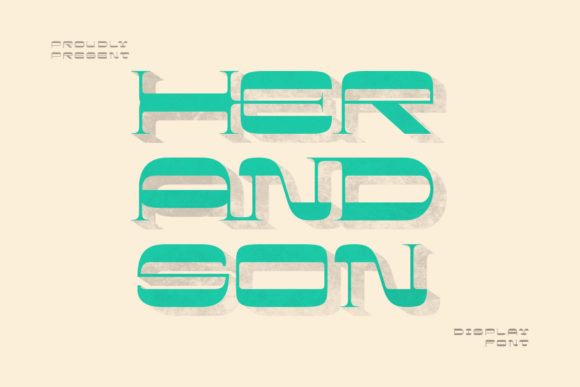
Choosing the right typeface for a project is rarely just about picking something that looks nice. It is about communication, tone, and technical reliability. When you are looking for a display font that brings a sense of cool, whimsical energy to your designs, Her and Son often appears on the radar. It is not merely a standard serif or sans-serif; it is a characterful display typeface designed to grab attention and inject personality into headlines, logos, and branding materials.
However, many designers—especially those new to typography or working with specialized fonts—make critical errors when integrating unique fonts like Her and Son into their workflows. These mistakes can lead to broken layouts, inconsistent rendering, or simply a final product that fails to convey the intended magical aesthetic. Understanding the specific nature of this font, particularly its encoding structure, is the key to using it effectively without frustration.
Understanding the Nature of Her and Son
At its core, Her and Son is a display font. This means it is optimized for large sizes rather than body text. Its design language leans heavily into whimsy, featuring distinct shapes and decorative elements that suggest a hand-crafted or storybook quality. For creators in the entertainment, lifestyle, fashion, or creative agency sectors, this font offers an immediate visual hook. It signals creativity and approachability.
The primary appeal of Her and Son lies in its versatility within the display category. It can soften a harsh brand identity or add a touch of elegance to a playful campaign. However, its true power—and the source of many user difficulties—lies in how its characters are encoded. Unlike standard fonts that rely solely on the Operating System’s standard character mapping, Her and Son utilizes PUA (Private Use Area) encoding.
What Does PUA Encoding Mean for You?
If you are unfamiliar with PUA encoding, it might sound technical, but the concept is straightforward. Standard fonts map characters to specific Unicode code points (like 'A' being U+0041). In contrast, PUA-encoded fonts place their special glyphs—such as swashes, ligatures, alternate letters, and decorative flourishes—in the unused "Private Use Area" of the Unicode standard. This allows font developers to include hundreds of extra variations without conflicting with standard keyboard inputs.
For Her and Son, this means you have access to a vast library of stylistic alternatives. You are not limited to typing "Hello" and getting a standard "Hello." Instead, you can access unique swashes and ornaments that make the text feel bespoke. The prompt notes that you can access all these glyphs with ease, which is excellent news, provided you know where to look. Many users struggle here because they expect these features to appear automatically through standard keyboard shortcuts, which they do not.
Common Mistakes When Using Specialized Fonts
Even though accessing the glyphs is designed to be easy, the transition from downloading to implementing Her and Son often trips up creators. Here are the most frequent pitfalls and how to navigate around them.
Mistake 1: Assuming Automatic Swash Activation
A common misconception is that once you install Her and Son, every time you type a letter, it will randomly swap with a cooler, more whimsical version. While some modern fonts use OpenType features to do this automatically, PUA-encoded fonts typically require manual selection. If you type normally and get a standard glyph, do not assume the font is broken. Instead, you must actively choose the specific PUA character you want.
Correction: Learn to use the Glyph Panel in your design software (Adobe Illustrator, Photoshop, InDesign) or the Character Map utility on Windows/Mac. Search for the base letter, then browse the additional variants. This gives you precise control over which swash or ornament appears, ensuring consistency across your design.
Mistake 2: Ignoring Readability in Body Copy
It is tempting to use a striking display font like Her and Son for everything. However, because of its whimsical and potentially complex letterforms, it is generally unsuitable for long paragraphs of text. Using it for body copy can reduce readability and fatigue the reader’s eye. Furthermore, if the PUA glyphs are too decorative, they may become illegible at small sizes.
Correction: Reserve Her and Son for headlines, titles, pull quotes, and logo work. Pair it with a clean, neutral sans-serif or simple serif for any supporting text. This contrast highlights the whimsy of Her and Son while maintaining professional clarity.
Mistake 3: Overlooking Licensing and Embedding
When downloading or purchasing fonts, the license terms dictate how you can use them. A common error is assuming that a desktop license covers web embedding or app development. If you plan to use Her and Son on a website, you need a web font license. If you embed it in a PDF or an interactive presentation, check if that requires a separate permission.
Correction: Always read the End User License Agreement (EULA). Ensure that the license matches your distribution method. Misunderstanding this can lead to legal issues or forced removal of your content later.
Best Practices for Implementation
To get the most out of Her and Son, adopt a workflow that respects its unique structure. Start by installing the font correctly on your system. Then, before starting your design project, create a style guide or a reference sheet of your favorite swashes and alternates. This saves time during the creative process, allowing you to drag and drop rather than hunt through menus.
- Test at Size: Always preview your text at the actual size it will be displayed. A swash that looks elegant at 72pt might look cluttered and unreadable at 12pt.
- Check Contrast: Because Her and Son has a distinct personality, ensure it contrasts well with your background color. Whimsical fonts often have fine details that can disappear against busy backgrounds.
- Use Consistent Pairings: If you use a specific swash for a header, try to maintain a similar level of decoration throughout the design hierarchy. Mixing overly ornate PUA glyphs with plain text can look disjointed.
Evaluating Whether Her and Son Fits Your Project
Before committing to Her and Son, ask yourself what message you want to send. Is your brand playful, creative, and perhaps a bit nostalgic? If so, this font is a strong candidate. Is your brand corporate, minimalist, or strictly informational? You might find that Her and Son distracts from your core message.
Consider the medium as well. Digital screens render fonts differently than print. Test the font on mobile devices to ensure the PUA glyphs render crisply on smaller screens. Sometimes, complex swashes can blur or pixelate on low-resolution displays, diminishing the quality of your work.
Final Thoughts on Creative Confidence
Typography is a powerful tool for setting the mood of a project. By understanding the technical nuances of fonts like Her and Son, you move from guesswork to intentional design. The PUA encoding is not a hurdle; it is a feature that unlocks a deeper level of customization. When you take the time to learn how to access these glyphs properly, you gain the ability to create visuals that are truly unique.
Do not let the complexity of specialized fonts intimidate you. With a little preparation and an awareness of common pitfalls, you can confidently add Her and Son to your toolkit. Let yourself be amazed by the outcome generated when you combine technical knowledge with creative vision. The result is not just a document or a design, but a cohesive, engaging experience that resonates with your audience.