Integrating Geir: A Practical Guide to Using Bold, Vintage Typography in Modern Workflows
In the landscape of digital design and visual communication, typography is rarely just about readability; it is a primary vehicle for tone, authority, and aesthetic identity. Among the myriad of typefaces available to designers, marketers, and content creators, Geir stands out as a distinct choice for projects requiring a specific kind of visual weight. It is not merely a font; it is a statement piece characterized by its bold, vintage styling, rough texture, and imposing letterforms.
For professionals ranging from small business owners to freelance publishers, selecting the right typeface is a critical decision that impacts brand perception and user engagement. This article explores how to practically integrate Geir into your creative workflows, ensuring that its unique characteristics enhance rather than hinder your project’s objectives. We will look at preparation, compatibility, implementation strategies, and long-term consistency.
Understanding the Visual Identity of Geir
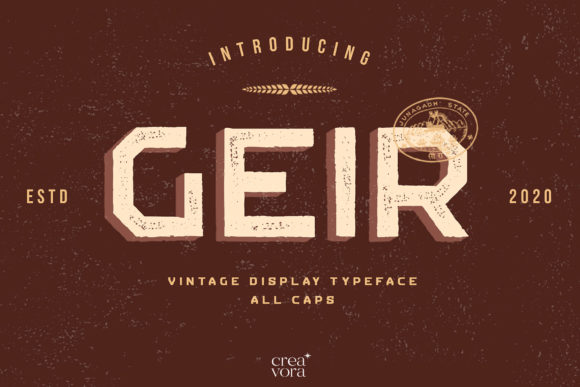
Before diving into technical implementation, it is essential to understand what makes Geir functionally different from standard sans-serif or serif fonts. Geir is defined by its rough textured display nature. The letters are not clean or minimalist; they possess a tactile quality that suggests age, wear, and authenticity. This "distressed" look is intentional, creating an immediate association with vintage aesthetics, industrial strength, or retro-modern styles.
The font is described as imposing. This means it commands attention. In a workflow where hierarchy is key, Geir naturally rises to the top. It is not designed for body text or dense paragraphs where legibility over long distances is paramount. Instead, it fits best in roles where impact is the primary goal: headlines, logos, posters, album covers, and promotional banners. Understanding this limitation is the first step in effective integration. Misusing Geir for lengthy text blocks can lead to reader fatigue, whereas using it correctly creates a powerful focal point.
Preparation and Asset Management
Successful integration of any specialized tool begins with proper preparation. For a font like Geir, which has complex textures and unique shapes, file management and version control are crucial. Here is how to prepare your workspace for seamless usage.
- File Format Verification: Ensure you have access to multiple formats (OTF, TTF, WOFF2). While OTF files offer advanced typographic features, web deployment requires optimized web fonts to maintain performance. Rough textures can sometimes increase file size due to complex vector paths or embedded bitmap data, so optimization is key.
- Kerning and Tracking Analysis: Because Geir features uniquely shaped letters, default kerning pairs may not always yield optimal results. Before applying the font to a final asset, spend time adjusting tracking (letter spacing) and kerning (pair-specific spacing). The rough edges of the characters might visually clash if placed too closely together, or look disjointed if spaced too far apart.
- Background Contrast Planning: The "rough" texture of Geir relies heavily on contrast to be visible. Prepare your background assets early. Dark backgrounds often make the white or light-colored distressed elements pop, while light backgrounds require careful color selection to ensure the texture doesn’t get lost in noise.
Strategic Implementation in Creative Projects
Once prepared, the next phase is execution. How does Geir fit into the actual creation process? Whether you are designing a brand identity, a marketing campaign, or educational material, the application of Geir should be deliberate.
Brand Identity and Logo Design
For entrepreneurs and small business owners, establishing a memorable visual identity is a long-term investment. Geir is particularly effective for brands that want to convey heritage, craftsmanship, or rugged reliability. Think of coffee roasters, craft breweries, automotive workshops, or heritage clothing lines.
When implementing Geir in a logo, focus on scalability. Test the font at very small sizes (e.g., favicon or mobile app icon). The rough texture may blur or become muddy when scaled down. If legibility suffers at small resolutions, consider simplifying the logo by using Geir only for the primary wordmark and pairing it with a cleaner, simpler secondary font for subtext.
Marketing Materials and Advertising
In the realm of marketing, attention spans are short. Geir’s imposing nature makes it an excellent tool for grabbing attention in crowded feeds or print environments. Use it for:
- Headlines: Use Geir for the main hook of a blog post, ad copy, or email subject line.
- Call-to-Action Buttons: While less common, Geir can be used for button text if the surrounding design is minimal, creating a striking contrast between the rough font and smooth UI elements.
- Event Posters: For concerts, festivals, or local events, Geir adds a layer of excitement and urgency that clean fonts often lack.
To maintain efficiency, create a template library. Save variations of Geir with different colors, opacities, and slight distortions. This allows you to quickly generate consistent assets without reinventing the wheel for every campaign.
Pairing Geir with Complementary Resources
No font exists in isolation. To maximize the effectiveness of Geir, it must interact harmoniously with other design elements. The key principle here is balance. Because Geir is visually heavy and textured, it needs support from lighter, cleaner elements.
Pairing Strategies:
- Clean Sans-Serifs: Pair Geir with modern, geometric sans-serifs (like Helvetica, Montserrat, or Roboto) for body text. This creates a classic "headline vs. body" dynamic that is easy for the eye to process. The clean lines of the supporting font provide a restful contrast to the busy texture of Geir.
- Minimalist Imagery: Avoid cluttering Geir with overly detailed background images. Let the font breathe. If the background is complex, use overlays or negative space to isolate the text. This ensures the "distinct touch" of Geir remains the focal point.
- Color Palettes: Vintage styles often pair well with muted, earthy tones (ochre, olive, rust) or high-contrast monochrome schemes. Avoid neon or overly saturated digital colors unless you are aiming for a specific, ironic retro-futurism look.
Workflow Integration and Quality Control
For productivity-minded users and agencies, integrating Geir into a team workflow requires clear guidelines. Consistency is vital to prevent brand dilution.
Establishing Usage Guidelines
Create a simple style guide document that specifies:
- Where Geir can and cannot be used.
- Minimum size requirements to preserve texture integrity.
- Approved color combinations.
- Clearance rules around surrounding graphics.
This reduces decision fatigue for team members and ensures that every output, whether created by a senior designer or a junior intern, meets quality standards.
Tech Stack Compatibility
If you are working within specific platforms like WordPress, Shopify, or Canva, verify that Geir is supported. Some drag-and-drop builders have limited font libraries. In such cases, you may need to upload the font manually or convert the text to an image/SVG for precise control. Be aware that converting text to images increases page load times and hurts SEO. Use this method sparingly, primarily for hero sections where visual impact outweighs minor performance costs.
Long-Term Maintenance and Adaptation
Typography trends shift, but vintage styles tend to have longer shelf lives because they evoke nostalgia. However, even Geir requires periodic review. As screen resolutions improve (4K, Retina displays), the rough texture of Geir may appear sharper and more detailed than intended. Regularly audit your designs to ensure the font still aligns with your brand’s current voice.
Furthermore, stay mindful of accessibility. The imposing and textured nature of Geir can pose challenges for users with dyslexia or low vision. Always provide alternatives or ensure sufficient contrast ratios. Tools like WebAIM’s contrast checker can help verify that your use of Geir meets WCAG (Web Content Accessibility Guidelines) standards.
Conclusion
Geir is more than just a decorative typeface; it is a strategic asset for creators who need to inject personality, history, and boldness into their work. By understanding its visual weight, preparing assets carefully, pairing it with complementary resources, and integrating it into structured workflows, you can leverage its full potential. Whether you are launching a new product, redesigning a website, or crafting a social media campaign, Geir offers a distinct touch that cuts through the noise. The key lies in disciplined application—using its power where it matters most, and letting it shine without overwhelming the viewer.